
Tech Support and Activation Help

  • About
  • Contact Us
  • Disclaimer
  • Privacy Policy
News Ticker
  • [ April 28, 2026 ] Is Brawl Stars Down | When will it be back? Server
  • [ April 28, 2026 ] Latest 2026 Seminar Topics For Computer Science for BTech Students India
  • [ April 28, 2026 ] HMRC State Pension Error UK | How to Identify and Fix the Issue UK
  • [ April 28, 2026 ] A Running Instance Of Acrobat Has Caused An Error | How to Fix it Error Fix
  • [ April 28, 2026 ] ID10T Error : Key Aspects of an ID10T Error Error Fix
HomeLoginTN ePass Login | Applying for a New TN ePass

TN ePass Login | Applying for a New TN ePass

June 3, 2025 Kroger Login 0

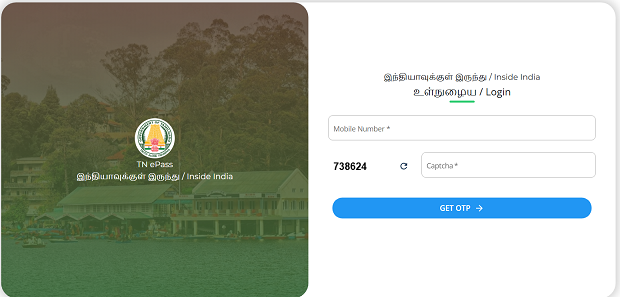
To log in to the Tamil Nadu ePass portal—required for visiting destinations like Ooty and Kodaikanal— Go to https://epass.tnega.org. For domestic travelers, input your mobile number.

Please follow these steps:


🔐 TN ePass Login

  1. Visit the Official Portal: Go to https://epass.tnega.org.

  2. Select Your Travel Origin:

    • If you’re traveling within India, click on Within India.

    • If you’re traveling from outside India, click on Outside India.

  3. Enter Your Mobile Number or Email:

    • For domestic travelers, input your mobile number.

    • For international travelers, input your email address.

  4. Complete Verification:

    • Enter the Captcha code as displayed.

    • Click on “Get OTP”.

    • Enter the OTP received on your mobile or email.

  5. Access Your Dashboard: Upon successful verification, you’ll be directed to your dashboard where you can apply for a new ePass or view existing ones.
tn-epass

Also Read : Universal Credit Log In


📝 Applying for a New TN ePass

  1. Choose Your Destination: From the dashboard, select your intended destination (e.g., Ooty, Kodaikanal).

  2. Fill in Travel Details:

    • Personal Information: Name, address, etc.

    • Travel Dates: Entry and exit dates.

    • Vehicle Details: Type, registration number, etc.

    • Accommodation Details: If available.

  3. Submit the Application: Review all details and submit the form.

  4. Download the ePass: Once approved, download the ePass in PDF format or take a screenshot for easy access during your travel.


📌 Important Notes

  • Validity: The ePass is valid only for the dates specified during application.

  • Mandatory Requirement: As per the Madras High Court directive, carrying an ePass is mandatory for entry into Ooty and Kodaikanal, effective from May 7, 2024.

  • Exemptions:

    • Residents of Nilgiris District with vehicles registered under “TN 43” are exempted.

    • Travelers using public transport or transporting essential goods may also be exempted.

Post Views: 2
Previous

https //uucms.karnataka.gov.in Register Login

Next

Universal Credit Log In | Sign in to your Universal Credit account

  • How to register your Samsung TV : Ways to Register
    July 14, 2021 2
  • Dhurandhar is Real Story or Not | What is Real
    December 10, 2025 0
  • When Will Destiny 2 Servers Be Back Up | Update 9.5.0.3
    December 16, 2025 0
  • How To Look for Termite Damage : How do I Know if I Have Termites?
    March 30, 2022 2
  • HMRC State Pension Error UK | How to Identify and Fix the Issue
    April 28, 2026 1
  • Skylight Paycard Enrollment Information : skylightpaycard.com Enrollment and Login
    May 18, 2023 2
  • Happy Muharram 2024 Greetings : Happy Muharram 2024 Wishes, Quotes, SMS, Messages
    July 15, 2024 0
  • auth.streamotion.com.au/activate and Login: Sign In to Watch Kayo Sports
    November 21, 2021 2
  • https //ecet.tsche.ac.in : TS ECET 2021 Results 2021
    August 18, 2021 0
  • Yoga Quotes in Sanskrit Language : Happy Yoga Day Quotes, Wishes, SMS, Messages
    June 10, 2024 0

Categories

Copyright © 2026 | MH Magazine WordPress Theme by MH Themes